It's the first time I've ever been to a temple in China.
QbitAI is public.
With WorkSwarm, if you want to add a new feature, can you tell Agent directly what you need, let it do it itself, and put it to the test?
This problem corresponds well to the extensibility discussed in the interpretation of the HyperAgent architecture. This is one of the eight characteristics openJiuwen proposed for HyperAgent, namely:From developer-friendly to RSI-friendly。
The expansion mechanism is designed to allow developers to access new capabilities, but also to allow Agents to improve their capabilities according to task feedback. After the changes are made, they must be installed in the application and tested in the actual task to see if the problem is solved, and where to change next round.
OpenJiuwen'sRSI is a native of AgentOS.RSI provides an operating environment for this recurring self-improvement.
It provides different types of expansion points across interfaces, gateways, service terminals, and agent execution.Running the entire cycleThe new features are available.Heating and coolingWhen you get in,No need to change the original codeThe expansion pack is available.Managed by version,The issue of the new edition can be reversed。
WorkSwarm uses this expansion mechanism.An agent application based on OpenJiuwen RSI's native AgentOSAgents can incorporate new features into AgentOS that can be loaded.Expansion packagesIt's the same packaging in the WorkSwarm.System Plugins。
Once enabled in "My Extension", you can go back to the task at hand and try it out. If you don't, tell Agent how to change it. This is what OpenJiuwen says: "Agent wants what he gets".
From WorkSwarm, turn yourself into a tabletop and see how RSI native AgentOS allows Agent to add functionality to itself.
If you want to talk to the agent for a couple of minutes, or if you want to change things temporarily, it's enough to have a conversation desk on your desk.
WorkSwarm doesn't have a tabletop shape by default, so can't Agent add one himself?
Speak directly to the Agent, such as, "Give WorkSwarm a tablecloth, and I'd like to talk to you on the table".
The agent can generate the extension package as you describe it and install it as an "application form" system plug-in in WorkSwarm. The RSI native behind WorkSwarm, AgentOS, is responsible for loading the extension so that the system plug-in works on the desktop.
Once the system plug-in is enabled, click on the switch button and the desktop picks up, leaving only the tabletop on the desktop.
You can choose a little bee, or you can change the style of the capsule. If you want to send messages, you have to open the desk.
Unlock OpenJiuwen RSI native AgentOS: How does the expansion package change the interface, gateway, service end and Agent behavior?
In the previous section, WorkSwarm enabled the system plug-in to turn itself into a desktop.
First, let's look at which parts of OpenJiuwen RSI's native AgentOS divide into interface, gateway and agent execution.
The system is divided into three main layers, from user requests to agent execution tasks.
Web clientsResponsible for displaying the interface, receiving user operations;GatewayResponsible for receiving and forwarding requests;Agent levelMeetings are administered by AgentServer, tasks are performed and tools are called by Harness.
All three layers have extended inputs, allowing both functionality on the interface and adjustment of how requests are processed and tasks executed.
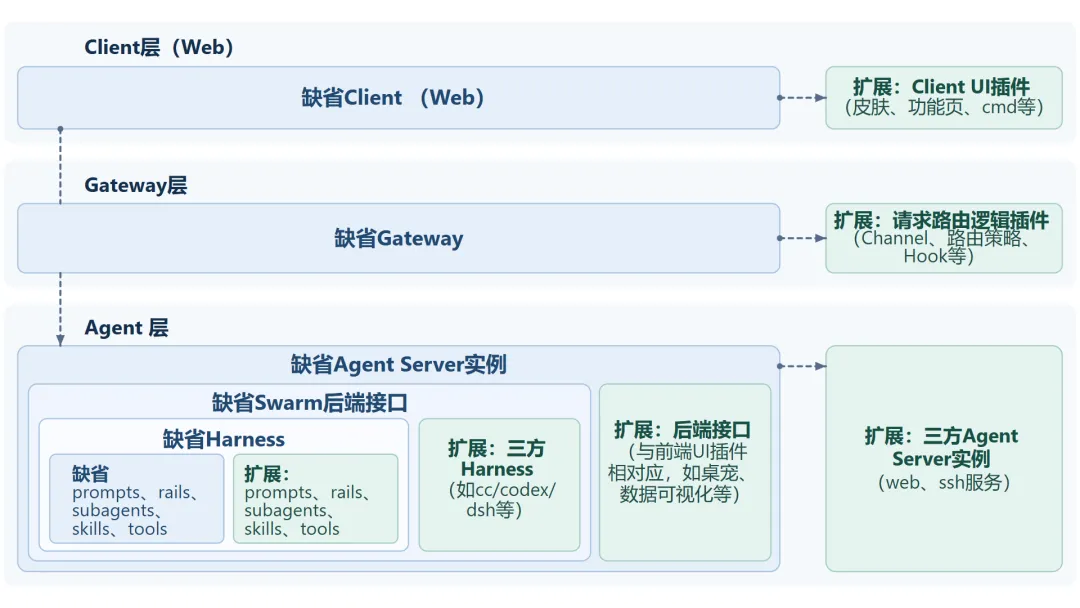 △OpenJiuwen RSI describes the native AgentOS architecture, the responsibilities of the Gateway and Agent client layers, connectivity relationships, and their respective extension inputs.
According to this architecture, the expansion capacity can be divided into five nodes.
ClientYou can add buttons, panels, and settings.GatewayAccess to identification rights or adjust request routing,AgentServerIt can handle meetings, messages and service-side commands.
I'm going back to the execution link.SwarmYou can customize the rules of collaboration between multiple Agents, track the progress of missions,AgentYou can adjust prompts, access tools, MCP services or sub-agents.
These changes are delivered by extending the package. The manifest.json in the package specifies the package's identifier, version, dependency, and code input. When it comes to the interface, it can also state where the components are to be displayed in the input area, sidebar, or setting page.
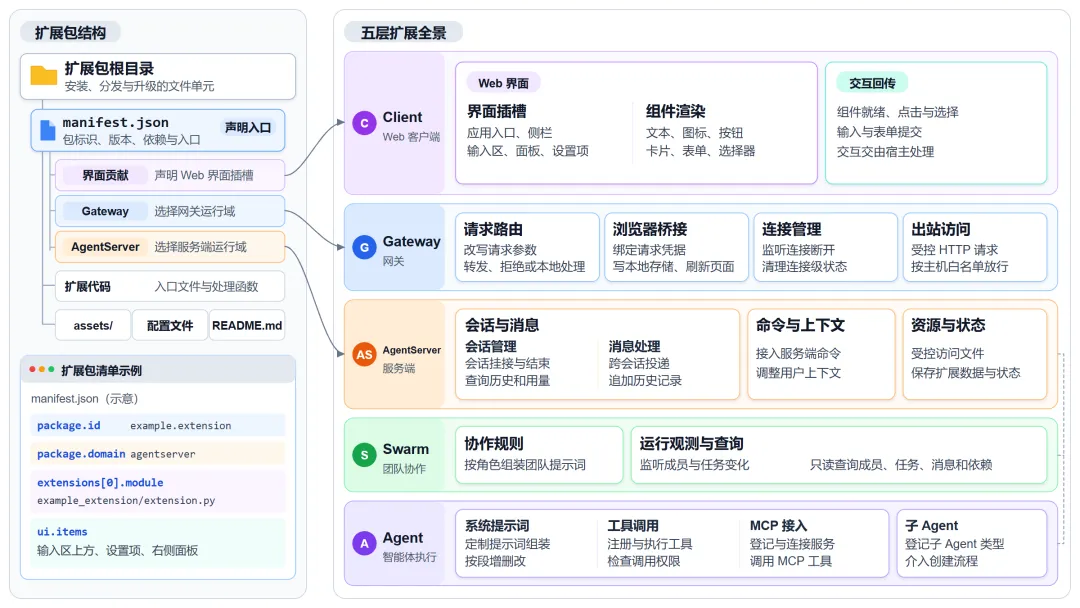 △Jiuwen RSI's native agentOS expansion capabilities on the left is the expansion directory and list, and on the right is the expansion capabilities on the five nodes of Client, Gateway, AgentServer, Swarm and Agent
When installed, the system reads and checks the list, saves the expansion pack by package ID and version. When loaded, Gateway and AgentServer respectively select from their own running packages, determine the version and sequence to be loaded, and register the processing functions in the extended code to their respective event baseline.
When the user clicks on the interface button, the gate receives a request, or the Agent starts assembling the prompt word, the corresponding component generates an event.The event interface finds the matching processing function and calls it• Processing functions can be involved in current processes and can also be used toOpsThe ability to call components open. When the interface needs to be refreshed, the extension can also send the data needed to be refreshed back to the web client.
△OpenJiuwen RSI Native AgentOS Extension Package Effectiveness Principles Extension packages from installation, selection of versions to loading of code, registration of processing functions, to response events and process for updating the interface as neededWhen selecting an extension point, it is possible to determine at what time to intervene, and then to see which Operations capabilities have been opened by the corresponding component.
△Expansion events with Operations capability speed charts The left side of the table is for all types of expansion events, the right side is for operations capabilities (Ops) that can be invoked by processing functions, and the table distinguishes between supported and planned entries.OpenJiuwen's native RSI AgentOS opens multiple types of expansion events. Below are the common trigger times for each type of event.
In the meantime, I'm going to talk to you.When sending or receiving cross-sectional messages and updating context usage.
Agent executed:When the agent starts to assemble the system prompts.
Swarm collaboration:When creating team collaboration rules, and after a change in team operating status.
Interface interaction:When the expansion interface is ready, or the user clicks on the button, select the option.
This is the first time I've seen this.Before the gateway distributes the request, or when the server handles the incoming commands.
What types of Ops can be called by the processing function to see in which component it operates.
Read the meeting dataThis includes historical messages, conversational rounds, and context usage.
Tools for Registering AgentsCalls for the Agency to execute missions.
Inquiry team informationMembers, task progress and dependency through read-only interfaces.
Update the desktop interfaceDisplays panels or refresh content at the location of the extended declaration.
HTTP requests through the gatewayAccess to the addresses allowed by the strategy.
Access to resources and statusRead files, save and extend their configuration and operating status within the scope of their authorization.
A complete list of the structure, events, and uses of Ops can be found in the OpenJiuwen Extension Development Documentation.
WorkSwarm System Plug-ins: Back and forth from creation, installation and failure
Based on the expansion mechanism of RSI native AgentOS, WorkSwarm can access the system plugins made by the Agent.
After installation, it is enabled in "My Extension" and can be adjusted by feedback after trying.Configuration from archive point to recoveryI'm going to continue to mediate.
The first system plug-in you'll be able to do while you're conversing with Agent
For the first time ever, a system plug-in can be used to develop Skil and Agent dialogues and side-by-side debugging.
For example, to do Token Weather, you can add a status bar above the input box to show the current session's Token usage, and the extent of occupancy of weather cues such as clear, multi-cloud, etc. Agents can code, pack and install to WorkSwarm as required.
Once the token weather system plug-in is enabled, you can try it. If you feel that the state occupies a lot of space, you can then say, "Do it a little more tightly and keep a percentage of the usage". The agent will modify the system plug-in and reload it with feedback and let you try again.
It is also possible to manually write the declaration and code of the system plugins into ZIP. If there is a dependency clause, write dependency and version requirements in the declaration, which WorkSwarm checks when loaded.
How to install and enable system plugins?
System plugins generated by developing Skill are automatically installed in WorkSwarm. There are three ways to install them manually.
Put it in the installation directory.If you put the uncompressed system plug-in files in the installation directory, WorkSwarm will load when it restarts.
Installed from the Extension Page.Click "Extend" on the sidebar to find the desired functionality in "System Plugin" and download the installation.
Installed by command.In the WorkSwarm dialog box, install local system plugins with /extension install.
In "My Extension→System Plugins", you can view the status of the installed system plugins or enable or disable the system plugins.
Once the installation is complete and the system plugins are enabled, you can verify the functionality. For example, in Token Weather, open the dialog, see if there is a status bar above the input box, and then send a message.
How to restore the original configuration when the system plug-in fails?
When trying new system plugins,It's time to re-configure and keep trying and changing.。
For example, a page can't open after it's enabled.Select an archive point prior to failure to restore the system plug-in configuration at the timeAfter retreating, re-open the problem page, confirm that it is in good use, and then continue to moderate.
What does RSI's native extension of AgentOS do? From customizing its own Agent applications, to supporting team collaboration and enterprise access.
With the expansion of RSI's native AgentOS, you can customize the application interface according to your habits, and you can view the workflow of a single Agent, adjusting the way it works.
When a task requires multiple Agents to complete it together, it's not easy.How teams work, how they communicate, and how they can be tailored to the project.• Applications can be accessed in an enterprise environment.Adjust access management and agent operation as required by deployment。
Front-end interface customization: Let Agent customize desktop interfaces with your style, with more flexibility
Front-end interface extensions can change the appearance and interaction of Agent applications. Agents can customize themes according to your preference, or add buttons, status tabs, or panels to the page's reserved location, placing commonly viewed information and commonly used operations where they are convenient.
In WorkSwarm, if you want to change the style of the interface, you can tell the agent to "make a few animated themes for the desktop, and I want to switch them in the settings".
Adjustment of Agent Harness: Making Agent's work process visible and how it works can be adjusted as needed
The single-agent extension provides access to session management, task execution, and other links. For example, it can display session status and context usage, allowing users to see how the agent works.
Extensions can also be added to the execution link depending on the task, adjusting the working rules in the prompts, or registering new tools for the Agent.
In WorkSwarm, wanting to know where the context of long conversations is used allows the agent to generate a system plugin for monitoring the context.
Once enabled, the panel displays the number of tokens entered and the window occupancy rate, and estimates the number of system prompts, skills, tool definitions, and messages.
You can also compare the input usage per model request, see the status and time spent on the tool calls, and view usage summaries and session messages from recent rounds.
Swarm collaboration enhancement: From customizing collaboration rules to tracking mission progress, seeing who's doing it and what's done.
When multiple Agents work together, it can be expanded byWrite down the rules of collaboration in your project's own assignment and assignment agreementsAfter the start of the mission, the expansion will also be able to receive notifications of changes in status.Tracking who's doing what, what steps they've taken。
For example, after assigning tasks to several Agents to see where they did it, you can use the expansion packet to develop Skill to allow the Agents to collaborate visually on the expansion packet as described by the generating team.
After installing WorkSwarm and enabling the corresponding system plugins, in Group mode, you can see in a single view the dependencies between team members, their respective responsibilities and tasks. If a task is still pending, you can see in sequence which pre-set work has not been completed.
Enterprise Access Adaptation: Enabling WorkSwarm to adapt to the enterprise environment, allowing access and operation to be adjusted as needed
When enterprises are logged in, RSI's native AgentOS expansion capabilities can be used to adjust account access and Agent's operating environment depending on deployment.
When deployed in a distributed manner, Gateway and AgentServer can run separately.Select the AgentServer that is connected to the Gateway by business and load the necessary extensions on both sides.。
For example, access identifiers on the Gateway side or adjustment of request routing, context on the AgentServer side for session replenishment projects, or adjustment of the parameters and execution of the end-of-service command.Access to third-party sandbox via adapterIt allows Agent to run commands and code in the selected environment.
In WorkSwarm, the Gateway login system plug-in can add a login page to the application's input and request a pre-approval certificate to enter the business process. Once enabled, unlogged users will see the login page, and protected requests will be blocked.
In WorkSwarm, the newly created Agent session provides the system plugins with three Harness options: Claude Code (CC), Codex, and openJiuwen. Once selected, the selected Harness executes the session's tasks, calls the tool, and switches the front-end interface.
What is the meaning of this verse?
The agent does the task and can modify itself manually. It can convert the proposed modification into an extension package for RSI native AgentOS that can be loaded and enabled as a system plug-in when installed in WorkSwarm.
Go back to the task and try again to adjust the interface and capabilities according to feedback. Try the useful system plugins and you can continue the next time you do the task. This is what openJiuwen says:It's what the agent wants.」。
As more links become open to expansion, individual usage habits, team collaboration rules, and business operational requirements can become the basis for Agents to adjust themselves.
When it's ready, it has a default look. What it will look like later, it can change itself into a real work.
Welcome to the WorkSwarm trial, work with Agent on any new feature you want, install your first system plug-in, and share the community experience!
Related Resources
WorkSwarm experience entry:
WorkSwarm GitHub code repository:https://github.com/openJiuwen-ai/jiuwenswarm
This is the first time we've done this.https://github.com/openJiuwen-ai/jiuwenswarm/blob/develop/docs/zh/Harness.md
OpenJiuwen expanded the development documentation:
*This text is licensed for publication by Qubit, and the views are solely those of the original authors.